Forum Replies Created
-
AuthorPosts
-
See Chapter 5.3, Tutorial Part 1.
Download: qucsstudio Tutorial part 1 (Time and Frequency simulation) as pdf-File, status quo = 230 pages from March 9th, 2016
Download: qucsstudio Tutorial part 2 (Harmonic Balance simulations) as pdf-File, status quo = 51 pages from January 1st,2016
fgsolve.m (*.txt renamed) is an example Octave routine for running a Qucsstudio simulation and importing the results in the Octave domain. The netlist.txt to be invoked must be prepared by the User. The simplest way is to draw the scematic and running it. netlist.txt is automatically placed in the user directory. Next, qucssim.exe is invoked in DOS with the specified input and output files. The results are made available for Octave by the standard function loadQucsVariable.m.
I had similar a problem when the SCH included blank (empty) lines.
– copy the SCH to an arbitrary folder outside qucs_home.
– open the SCH file and delete all blank lines.
– save, close and copy it bact to the prj folder of the v4.2.2 environment.
To my knowledge there is no such command (yet) in QucsStudio. However there is a possibility to run SCH-s from, and return data to Octave.
%outfile=fullfile(‘”C:\Documents and Settings\zhu\qucs3\model_prj”‘,’model.dat’);
%outfile=fullfile(‘C:\Documents and Settings\zhu\qucs3\model_prj’,’model.dat’);
outfile=’model.dat’;Neither of the commented lines work for resolving the problem of spaces in paths. Interestingly,
infile=fullfile(‘”C:\Documents and Settings\zhu\qucs3″‘,’netlist.txt’);
works for the input file.
There must exist a solution I do not know of.
qs_bin=getenv(‘qucs3_bin’); %environmental variable
qs_prj=getenv(‘qs_prj’); %environmental variable
qsfun=fullfile(qs_bin,’qucssim.exe’);
infile=fullfile(qs_prj,’netlist.txt’);
outfile=fullfile(qs_prj,’model.dat’);
%call Qucssim simulator
dostxt=[qsfun,’ -a ‘,infile,’ ‘,outfile, ‘>nul’];
dos(dostxt);The following error message appears:
Error: Wrong netlist line format ‘QucsData’ (line 1).
Using the original netlist created by QucsStudio the following error message appears:
Error: Wrong netlist line format ‘QucsData’ (line 1).
Try something like this.
Attachments:
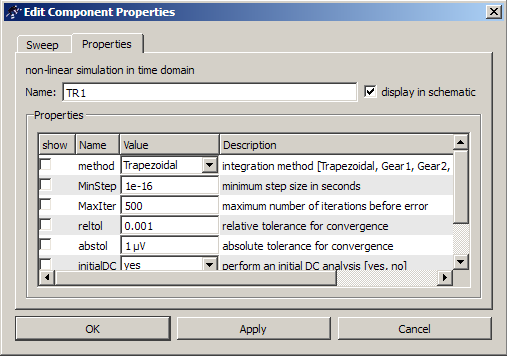
The configuration settings are not shown: the integration method must have been very likely the default “Trapezoidal”. Experiment with the Gear methods from Properties\Gear1 upwards.
Attachments:
Got nervous since s-parameter simulation is my everyday bread. A quick test with transit frequency FT did not show any difference. Could you reveal your example?
Attachments:
A detailed procedure is found in Gunthard Kraus’ Tutorial. Click “tutorial” on Main page:
New tutorials available
16th February 2016
A tutorial by Jose Manuel Campelo is now ready to download. Gunthard Kraus also upgraded his tutorial on his homepage.6. January 2021 at 17:29 in reply to: How to prevent going to .dpl tab after clicking on simulate button #693Uncheck the radio button “open data display after simulation” in the “edit Schematic Properties” window.
The purpose is to import measurement data from a CSV file to QucsStudio environment in *.dat format. The issue has been fixed: pathnames with spaces must be enclosed in double quotes.
THIS DOES NOT WORK:
cd(location of R6.csv)
pwd = D:\hicumL2\CSV_data %R6.csv resides here
dostxt = ‘C:\Programme\QucsStudio_332\QucsStudio\bin\qucsconv.exe -i R6.csv -if csv -of qucsdata -o C:\Documents and Settings\zhu\qucs3\DC_prj\full_R6.dat’;
dos(dostxt);
THIS WORKS:
cd(location of R6.csv)
pwd = D:\hicumL2\CSV_data %R6.csv resides here
dostxt = ‘C:\Programme\QucsStudio_332\QucsStudio\bin\qucsconv.exe -i R6.csv -if csv -of qucsdata -o “C:\Documents and Settings\zhu\qucs3\DC_prj\full_R6.dat”‘;
dos(dostxt);
Thank for dealing with this issue!
Attachments:
Right click on the transistor, Edit Properties, roll down to the parameter IRb=50.3624 and set it to IRb=0. This parameter has been re-installed in v3.3.2 and this device must have been skipped.
-
AuthorPosts