Forum Replies Created
-
AuthorPosts
-
20. November 2023 at 14:47 in reply to: Simulation of S-Parameter-Matrix with complex Port Impedances #8079
I just got the hint that there was a bug in the picture above (wrong connection of SnP component). Therefore, I removed it.
Here is the correct schematic for complex port impedances in s-parameter simulations. Note that port 2 of the file component X1 must be connected to the s-parameter source P1.
By the way, this concept gives correct results for noise figure NF and NFmin, but not for optimum source impedance Sopt.

-
This reply was modified 2 years, 5 months ago by
maelh.
Yes, you’re right indeed. Thanks a lot for reporting this bug! Fortunately, fixing this is simple.
Great! Thanks a lot indeed!
Thanks for offering help! This keeps the project alive. I will contact you for details.
Concerning the future of QucsStudio, I will do my best to keep it running. But as you can see on this forum (for example), interest and support is quite low. And so is the progress, too. But maybe I will find a sponsor that boosts the development. Let’s see…
11. August 2023 at 15:06 in reply to: Behavior of InitialDC in Transient Simulation inconsistent with explicit IC #7505Even though your thoughts make sense, I don’t think that the current behavior is inconsistent. Proposal A is not bad, but I still find the current solution the best one.
Problem nr 1 is indeed a bug. Thanks a lot for reporting it!
Concerning problem nr 3: GaCircle(200) means plot the circle for power gain = 200. The number in the bottom left corner of a smith chart appears if the data is outside the unity circle and gives the outer radius of the chart.
Yes, the range() function makes the trouble, because it creates a new dependency.
But it works, if you write “average(range(Isw.it, 4.5ms, 5ms))” directly into the diagram.
It also works with “Export=no” in an equation component. But then, the equation must be in the same document like the diagram. I.e. if you use a different document for the diagrams than for the schematic, place the equation together with the diagrams. “Export=no” is not necessary then.
This is an interesting feature indeed! Which functionality would you propose, i.e. an example? Do you know how a Python API works, i.e. do you have a simple example code (C++ code for the application and for the Python side)?
Many thanks!
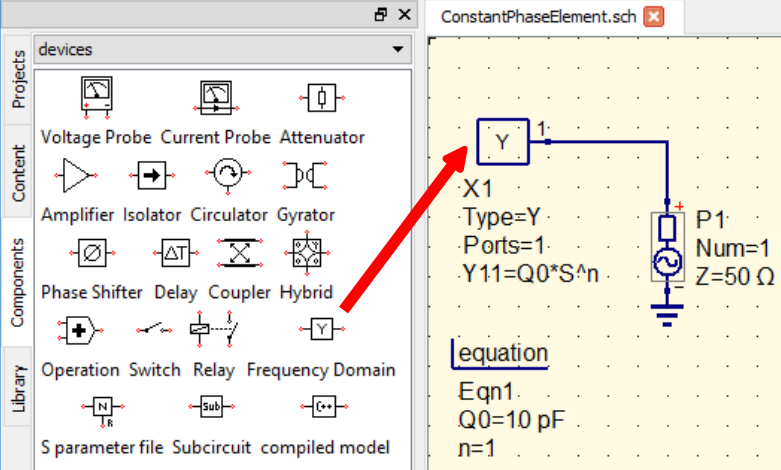
You can use the frequency domain component and enter the wanted equation. (see attached picture)
Attachments:
Yes, this is a bug. Up to now, the simulation engine can’t handle the different dependency. But the GUI can. So, you can either write the equation directly into the diagram, or chose “Export=no” in the equation block and then simulate again.
30. June 2023 at 16:08 in reply to: Can a company get a receipt for a big donation to Qucsstudio? #7406That’s great and just in time, as I’m currently thinking about how to keep the project alive.
I will contact you directly. Many thanks!The software is not abandoned, but there’s nobody who maintains the forum.
Everyone willing to help here is very welcome! Thanks a lot!
I just changed it. Thanks for the hint!
Yes, you are right, I can confirm it now.
Many thanks for the report!I cannot reproduce it!? When exactly does it happen?
> add equation block and add a variable a = 1. Apply. Ok.
“Ok” is enough, “Apply” is not needed.> Now you should have y=1 and a=1.
Should have or do you have it?> open it again, delete a. Apply. ok.
Again “Apply” is not necessary.> open it again. Add. enter name ‘b’. enter value ‘2’. Apply.
So you change ‘y’ to ‘b’ and ‘1’ to ‘2’ and then press “Apply” and not “ok”?> name is now automatically change to ‘a’ , which it should not.
You mean you are still in the dialog and the ‘b’ in the line-edit field is changed to ‘a’?Thanks!
-
This reply was modified 2 years, 5 months ago by
-
AuthorPosts